Error saving any Peertube configuration

Clean install onto new Oracle Cloud Ubuntu

Up and running however

Making any administration / config change I see the following

Error

413 Request Entity Too Large

413 Request Entity Too Large


nginx/1.29.2

Tried to edit as per some online guide however file not found

sudo nano /etc/nginx/nginx.conf

Any advice appreciated

Peter

Hi pwwuk

I don’t know ‘Oracle Cloud Ubuntu’, i would really need more context to have any hint to give.

You indicates ngninx with a 413 error, for which there are many answers about changing nginx configuration, and usualy it is in /etc/nginx/nginx.conf.

Let’s start with some questions :

What is the online guide you refers to ? Does it apply to ‘Oracle Cloud Ubuntu’ or is it a generic answer ?

Can you read it ( sudo cat /etc/nginx/nginx.conf ) ?

Is there a /etc/nginx ? What does it contain ( sudo ls -la /etc/nginx ) ?

Do you have full sudo access to your system ? is nano installed, ( or vi ) ?

Regards,

Hi Thank you for your reply. Much appreciated.

Running Ubuntu on an Oracle Cloud VM.

I found a similar error reported here https://www.reddit.com/r/PeerTube/comments/tne0p2/request_entity_too_large_when_trying_to_save_any/

ubuntu@Casey:~$ sudo cat /etc/nginx/nginx.conf
cat: /etc/nginx/nginx.conf: No such file or directory

ubuntu@Casey:~$ sudo ls -la /etc/nginx
ls: cannot access ‹ /etc/nginx ›: No such file or directory

I do have nginx folder in my docker volume

I do have nginx.conf here

However editing gets me a duplicate issue on client_max_body_size

It is all very odd as its running really well .. 1st videos uploaded .. running great .. just cant edit config.

Any further advice appreciated.

Peter

In your configuration, do you have very long text in some fields? (in your instance information for example?)

I can see in the official Peertube nginx configuration that the max client body size for API calls is set to only 100k:

Maybe try to increase this value, and see if it works.
If so, maybe we should open an issue on github. The number of preferences in Peertube has grown with time, so maybe this limit is not enough nowadays.

1 Like

@pwwuk Don’t edit /var/lib/docker/overlay2/ files, those belong to docker internal.

You have to find the container id or name for nginx container that i will reference as later.

sudo docker container ps

will give you the list, and search within this with nginx.

once found sudo docker container restart <container name>

should help

sudo docker exec -it <container name> bash

will open a shell within container where you can operate.

but restart should do it.

Many thanks .. already set to 100M

  STATUS        PORTS                                                                          NAMES
af40f167fae8   certbot/certbot                           "/bin/sh -c 'trap ex…"   25 hours ago   Up 24 hours   80/tcp, 443/tcp                                                                certbot
0a7571661b77   chocobozzz/peertube-webserver:latest      "/bin/sh entrypoint.…"   25 hours ago   Up 24 hours   0.0.0.0:80->80/tcp, [::]:80->80/tcp, 0.0.0.0:443->443/tcp, [::]:443->443/tcp   peertube-webserver-1
7d98af645dfa   chocobozzz/peertube:production-bookworm   "/usr/local/bin/entr…"   25 hours ago   Up 24 hours   1936/tcp, 0.0.0.0:1935->1935/tcp, [::]:1935->1935/tcp, 9000/tcp                peertube-peertube-1
44c4c60960a8   postgres:13-alpine                        "docker-entrypoint.s…"   25 hours ago   Up 24 hours   5432/tcp                                                                       peertube-postgres-1
38c5a657a834   redis:6-alpine                            "docker-entrypoint.s…"   25 hours ago   Up 24 hours   6379/tcp                                                                       peertube-redis-1
2124b22d039e   mwader/postfix-relay                      "/root/run"              25 hours ago   Up 24 hours   25/tcp                                                                         peertube-postfix-1

@pwwuk Can you apply preformatted text on terminal output in your post :folded_hands: for sake of other other who will read this :wink: ?

and relaunch the command seems something else about certbot renewal did pop in the middle

name of related container might be peertube-webserver-1

so

sudo docker container restart peertube-webserver-1

Help much appreciated !
Worked out preformat terminal output.

I ran sudo docker compose down and then nback up (stopped and satred all containers ) .
sudo docker container restart peertube-webserver-1
ran OK
I did see

webserver-1 exited with code 137 (restarting)
webserver-1  | nginx: [warn] the "listen ... http2" directive is deprecated, use the "http2" directive instead in /etc/nginx/conf.d/default.conf:23
webserver-1  | nginx: [warn] the "listen ... http2" directive is deprecated, use the "http2" directive instead in /etc/nginx/conf.d/default.conf:24

Which is most confusing as I don’t have an /etc/nginx/conf.d/default.conf

On resatrt still working .. I can upload videoes .. change content .. change encodeing however if I change anything in setting (even my 1 character) and I still get ‹ 413 Request Entity Too Large ›

sudo docker exec -it peertube-webserver-1 cat /etc/nginx/conf.d/default.conf

you might want to redact any domain name ( server_name ) before posting.

sudo docker exec -it peertube-webserver-1 cat /etc/nginx/conf.d/default.conf
# Minimum Nginx version required:  1.13.0 (released Apr 25, 2017)
# Please check your Nginx installation features the following modules via 'nginx -V':
# STANDARD HTTP MODULES: Core, Proxy, Rewrite, Access, Gzip, Headers, HTTP/2, Log, Real IP, SSL, Thread Pool, Upstream, AIO Multithreading.
# THIRD PARTY MODULES:   None.

server {
  listen 80;
  listen [::]:80;
  server_name caseyandbros.walker.id;

  location /.well-known/acme-challenge/ {
    default_type "text/plain";
    root /var/www/certbot;
  }
  location / { return 301 https://$host$request_uri; }
}

upstream backend {
  server peertube:9000;
}

server {
  listen 443 ssl http2;
  listen [::]:443 ssl http2;
  server_name caseyandbros.walker.id;

  access_log /var/log/nginx/peertube.access.log; # reduce I/0 with buffer=10m flush=5m
  error_log  /var/log/nginx/peertube.error.log;

  ##
  # Certificates
  # you need a certificate to run in production. see letsencrypt.org
  ##
  ssl_certificate     /etc/letsencrypt/live/caseyandbros.walker.id/fullchain.pem;
  ssl_certificate_key /etc/letsencrypt/live/caseyandbros.walker.id/privkey.pem;

  location ^~ '/.well-known/acme-challenge' {
    default_type "text/plain";
    root /var/www/certbot;
  }

  ##
  # Security hardening (as of Nov 15, 2020)
  # based on Mozilla Guideline v5.6
  ##

  ssl_protocols             TLSv1.2 TLSv1.3;
  ssl_prefer_server_ciphers on;
  ssl_ciphers               ECDHE-ECDSA-AES256-GCM-SHA384:ECDHE-RSA-AES256-GCM-SHA384:ECDHE-ECDSA-CHACHA20-POLY1305:ECDHE-RSA-CHACHA20-POLY1305:ECDHE-ECDSA-AES128-GCM-SHA256:ECDHE-RSA-AES128-GCM-SHA256:ECDHE-ECDSA-AES256-SHA384:ECDHE-RSA-AES256-SHA384:ECDHE-ECDSA-AES128-SHA256:ECDHE-RSA-AES128-SHA256; # add ECDHE-RSA-AES256-SHA if you want compatibility with Android 4
  ssl_session_timeout       1d; # defaults to 5m
  ssl_session_cache         shared:SSL:10m; # estimated to 40k sessions
  ssl_session_tickets       off;
  # HSTS (https://hstspreload.org), requires to be copied in 'location' sections that have add_header directives
  #add_header Strict-Transport-Security "max-age=63072000; includeSubDomains";

  ##
  # Application
  ##

  location @api {
    proxy_set_header X-Forwarded-For $proxy_add_x_forwarded_for;
    proxy_set_header Host            $http_host;
    proxy_set_header X-Real-IP       $remote_addr;

    client_max_body_size  1000M; # default is 1M

    proxy_connect_timeout 10m;
    proxy_send_timeout    10m;
    proxy_read_timeout    10m;
    send_timeout          10m;

    proxy_pass http://backend;
  }

  location / {
    try_files /dev/null @api;
  }

  location ~ ^/api/v1/videos/(upload-resumable|([^/]+/source/replace-resumable))$ {
    client_max_body_size    0;
    proxy_request_buffering off;

    try_files /dev/null @api;
  }

  location ~ ^/api/v1/users/[^/]+/imports/import-resumable$ {
    client_max_body_size    0;
    proxy_request_buffering off;

    try_files /dev/null @api;
  }

  location ~ ^/api/v1/videos/(upload|([^/]+/studio/edit))$ {
    limit_except POST HEAD { deny all; }

    # This is the maximum upload size, which roughly matches the maximum size of a video file.
    # Note that temporary space is needed equal to the total size of all concurrent uploads.
    # This data gets stored in /var/lib/nginx by default, so you may want to put this directory
    # on a dedicated filesystem.
    client_max_body_size                      1200M; # default is 1M
    add_header            X-File-Maximum-Size 8G always; # inform backend of the set value in bytes before mime-encoding (x * 1.4 >= client_max_body_size)
    proxy_request_buffering off;

    try_files /dev/null @api;
  }

  location ~ ^/api/v1/runners/jobs/[^/]+/(update|success)$ {
    client_max_body_size    0;
    proxy_request_buffering off;

    try_files /dev/null @api;
  }

  location ~ ^/api/v1/(videos|video-playlists|video-channels|users/me) {
    client_max_body_size                      1200M; # default is 1M
    add_header            X-File-Maximum-Size 8M always; # inform backend of the set value in bytes before mime-encoding (x * 1.4 >= client_max_body_size)

    try_files /dev/null @api;
  }

  ##
  # Websocket
  ##

  location @api_websocket {
    proxy_http_version 1.1;
    proxy_set_header   X-Forwarded-For $proxy_add_x_forwarded_for;
    proxy_set_header   Host            $http_host;
    proxy_set_header   X-Real-IP       $remote_addr;
    proxy_set_header   Upgrade         $http_upgrade;
    proxy_set_header   Connection      "upgrade";

    proxy_pass http://backend;
  }

  location /socket.io {
    try_files /dev/null @api_websocket;
  }

  location /tracker/socket {
    # Peers send a message to the tracker every 15 minutes
    # Don't close the websocket before then
    proxy_read_timeout 15m; # default is 60s

    try_files /dev/null @api_websocket;
  }

  # Plugin websocket routes
  location ~ ^/plugins/[^/]+(/[^/]+)?/ws/ {
    try_files /dev/null @api_websocket;
  }

  ##
  # Performance optimizations
  # For extra performance please refer to https://github.com/denji/nginx-tuning
  ##

  root /var/www/peertube/storage;

  # Enable compression for JS/CSS/HTML, for improved client load times.
  # It might be nice to compress JSON/XML as returned by the API, but
  # leaving that out to protect against potential BREACH attack.
  gzip              on;
  gzip_vary         on;
  gzip_types        # text/html is always compressed by HttpGzipModule
                    text/css
                    application/javascript
                    font/truetype
                    font/opentype
                    application/vnd.ms-fontobject
                    image/svg+xml
                    application/xml;
  gzip_min_length   1000; # default is 20 bytes
  gzip_buffers      16 8k;
  gzip_comp_level   2; # default is 1

  client_body_timeout       30s; # default is 60
  client_header_timeout     10s; # default is 60
  send_timeout              10s; # default is 60
  keepalive_timeout         10s; # default is 75
  resolver_timeout          10s; # default is 30
  reset_timedout_connection on;
  proxy_ignore_client_abort on;

  tcp_nopush                on; # send headers in one piece
  tcp_nodelay               on; # don't buffer data sent, good for small data bursts in real time

  # If you have a small /var/lib partition, it could be interesting to store temp nginx uploads in a different place
  # See https://nginx.org/en/docs/http/ngx_http_core_module.html#client_body_temp_path
  #client_body_temp_path /var/www/peertube/storage/nginx/;

  # Bypass PeerTube for performance reasons. Optional.
  # Should be consistent with client-overrides assets list in client.ts server controller
  location ~ ^/client/(assets/images/(default-playlist\.jpg|default-avatar-account\.png|default-avatar-account-48x48\.png|default-avatar-video-channel\.png|default-avatar-video-channel-48x48\.png))$ {
    add_header Cache-Control "public, max-age=31536000, immutable"; # Cache 1 year

    root /var/www/peertube;

    try_files /storage/client-overrides/$1 /peertube-latest/client/dist/$1 @api;
  }

  # Bypass PeerTube for performance reasons. Optional.
  location ~ ^/client/(.*\.(js|css|png|svg|woff2|otf|ttf|woff|eot))$ {
    add_header Cache-Control "public, max-age=31536000, immutable"; # Cache 1 year

    alias /var/www/peertube/peertube-latest/client/dist/$1;
  }

  location ~ ^(/static/(webseed|web-videos|streaming-playlists/hls)/private/)|^/download {
    # We can't rate limit a try_files directive, so we need to duplicate @api

    proxy_set_header X-Forwarded-For $proxy_add_x_forwarded_for;
    proxy_set_header Host            $http_host;
    proxy_set_header X-Real-IP       $remote_addr;

    proxy_limit_rate 5M;

    proxy_pass http://backend;
  }

  # Bypass PeerTube for performance reasons. Optional.
  location ~ ^/static/(webseed|web-videos|redundancy|streaming-playlists)/ {
    limit_rate_after            5M;

    set $peertube_limit_rate  5M;

    # Use this line with nginx >= 1.17.0
    limit_rate $peertube_limit_rate;
    # Or this line with nginx < 1.17.0
    # set $limit_rate $peertube_limit_rate;

    if ($request_method = 'OPTIONS') {
      add_header Access-Control-Allow-Origin  '*';
      add_header Access-Control-Allow-Methods 'GET, OPTIONS';
      add_header Access-Control-Allow-Headers 'Range,DNT,X-CustomHeader,Keep-Alive,User-Agent,X-Requested-With,If-Modified-Since,Cache-Control,Content-Type';
      add_header Access-Control-Max-Age       1728000; # Preflight request can be cached 20 days
      add_header Content-Type                 'text/plain charset=UTF-8';
      add_header Content-Length               0;
      return 204;
    }

    if ($request_method = 'GET') {
      add_header Access-Control-Allow-Origin  '*';
      add_header Access-Control-Allow-Methods 'GET, OPTIONS';
      add_header Access-Control-Allow-Headers 'Range,DNT,X-CustomHeader,Keep-Alive,User-Agent,X-Requested-With,If-Modified-Since,Cache-Control,Content-Type';
    }

    # Enabling the sendfile directive eliminates the step of copying the data into the buffer
    # and enables direct copying data from one file descriptor to another.
    sendfile on;
    sendfile_max_chunk 1M; # prevent one fast connection from entirely occupying the worker process. should be > 800k.
    aio threads;

    # web-videos is the name of the directory mapped to the `storage.web_videos` key in your PeerTube configuration
    rewrite ^/static/webseed/(.*)$ /web-videos/$1 break;
    rewrite ^/static/(.*)$         /$1        break;

    try_files $uri @api;
  }
}

Thank you .. see below .. happy for server name in as public ..

sudo nano /etc/nginx/conf.d/default.conf

Still gives no such file / directory

Looking forward to next steps to try .. very much appreciate the help

@pwwuk when connect as your user directly on the host you don’t have access to docker content, it is in other container / namespaces.

to enter in docker container you first have to do :

sudo docker exec -it peertube-webserver-1 bash

Then your are in root within your container and you can edit configuration.

But lets go back in time : how did you install peertube, what tutorial did you follow ?
This recommended is Docker guide | PeerTube documentation .

Installed following

Which referenced / followed

Sorry
ubuntu@Casey:~/docker/peertube$ sudo docker exec -it peertube-webserver-1 bash
OCI runtime exec failed: exec failed: unable to start container process: exec: « bash »: executable file not found in $PATH: unknown

@pwwuk This is fine, i get the picture now

I did connect to your instance nice videos of paris trip btw :wink:

What i understood :

You use codium with a ssh plugin to operate a Oracle Cloud Ubuntu. This is a small difference from the vultr used in the tutorial.
The other change is install directory on /home/ubuntu/docker/peertube instead on /opt/peertube in the tutorial and log as ubuntu instead of root.

docker install of peertube what done using standard docker peertube installation.

Within your docker-volume you will find all persistent data, if you remove it you will mainly lose your videos and related informations, well everything about peertube :wink:

What is difficult with docker is that what you see on your host will be named, organized differently within docker and even can be temporary there only accessible within containers. All that is visible in docker-compose, mainly mappings of volumes.

I will come back with more hints, one thing about this docker install is that webserver provided is somehow a convenience to make things faster. in many case a web server is already existing and configuration is done in it, webserver part of docker-compose is then commented out.

In my personal case i don’t use docker, my peertube install is fully done manually under a debian host and i manage my nginx in my way.

Quickly to get things better is to stop docker-compose, from within docket/ubuntu directory edit peertube from docker-volume/nginx , ( or even remove it ? normaly it should be regenerated with standard defaults ) and restart docker-compose.

Usual way to deal with docker is to not change thing within them but change their configuration and restart them. And in our case just to use new nginx configuration it is mandatory to restart cotainer, that can somehow tweak configuration again.

By default with correct .env setting this should work, so there can be problems with the host configuration itself. From here i would ask : what sizing of memory did your pick for your host in Oracle Cloud ?

i will come back later with more hints.

@pwwuk

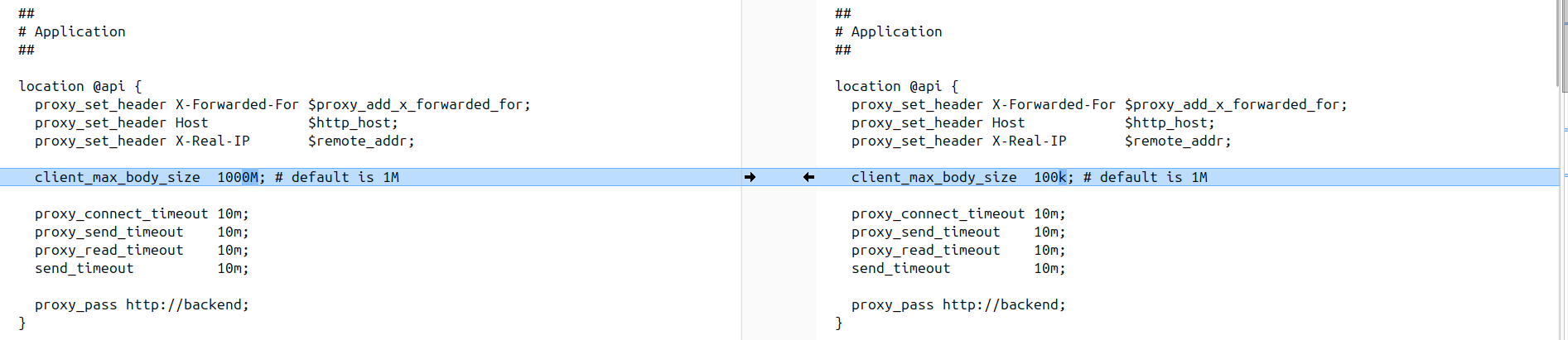
Following thing is wrong again, your default configuration is already containing 1000M.

comparing what is in github master peertube nginx configuration and yours show this client_max_body_size 100k; that is too small for a config and for many other api requests.

And that is exactly what @JohnLivingston did propose yesterday :wink: and your default.conf contains it…

stopping docker-compose

editing the file with client_max_body_size 1000M; in codium docker-volume/nginx/peertube file

restarting docker-compose should hopefully do it.

then check again that docker-volume/nginx/peertube file contains right things.

Difficult thing here is that nginx configuration is regenerated by webserver to end as default.conf.

( my previous assessment : comes from peertube container startup, is stored within a non persistent volume within assets and reused by webserver was wrong )